Showing posts with label Desktops. Show all posts

Friday, March 26, 2010

GuideHP TouchSmart 600


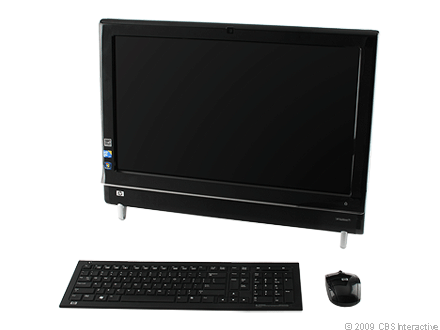
The HP TouchSmart 600 shows how getting an early jump on unproven technology can pay off. HP was first to market with a touch-based all-in-one PC more than two years ago. Now that Windows 7 has spurred almost every major desktop vendor toward multitouch, HP has the advantage of years of real market feedback to help refine the TouchSmart 600. The result, while still not perfect, is the best implementation of touch input we've seen so far in an all-in-one. Also to HP's credit (and likely Sony's chagrin), even if the TouchSmart 600 had no touch capability, by incorporating all of the features we've loved in Sony's Vaio LV line, HP has matched Sony in crafting a robust standalone home entertainment device. This $1,599, 23.5-inch all-in-one won't be for everyone, but those willing to find room for the TouchSmart A600, cooks especially, will be rewarded with an innovative, feature-rich all-in-one.

On the outside the TouchSmart 600 doesn't look that different from HP's previous all-in-one, the TouchSmart IQ816. It has the same glossy black plastic exterior, with graceful curves down its side. It's not quite as design-forward as the iMac, but it's as visually appealing, if not more so, than new all-in-ones from Gateway and Sony.

What HP's design lacked in its earlier version was an easy means to mount it on the wall. Sony made a big push last year to position its LV series all-in-ones as living room-ready devices, which had both the hardware and the design elements to match. Clearly taking a page from Sony's guidebook, HP has made the TouchSmart fully VESA-mount compliant. Simply unscrew a panel on the back and then unscrew the stand to reveal the wall-mount inputs.


HP made the TouchSmart 600 home entertainment-friendly by adding HDMI and composite audio/video inputs and a dedicated button for switching between sources.

HP has also borrowed from Sony's shrewd connectivity features, and taken them one step further. HP has added not only an HDMI input with a dedicated button for switching input signals, but also a set of composite video and audio ports as well. That means you can connect multiple external video sources to the TouchSmart, such as game consoles, a cable box, or HD cameras, and switch between them and your Windows desktop seamlessly. Sadly, but not surprisingly given the regulatory implications, you can't get Windows to talk to those devices, which means your DVR options are restricted to the built-in hybrid TV tuner. Sony's all-in-one has the same limitation.

Along with the inputs for external video sources, the TouchSmart A600 comes with a slot-loading Blu-ray drive, as well as touch-driven Hulu and Netflix interfaces into its new touch software carousel (more on that in a minute). All of these features would be meaningless without decent screen and audio quality to back them up, and for the most part the TouchSmart 600 delivers. The audio ouput is easily the strongest we've seen from an all-in-one this year, mostly because it's loud enough to fill a room. We noticed some pixel noise in the HD video from the 23.5-inch 1,920 x 1,080 display, but not enough to be distracting, especially if you're watching from a distance.

While HP has clearly borrowed from Sony in its wall-mounting and video input capabilities, the software designed for its touch interface is unique and just as compelling. We won't go over every feature in HP's custom-made application carousel, but you'll find the usual collection of painting, note taking, and other apps. But four new additions to HP's touch-screen arsenal set it apart, three from choosing partners wisely, and the fourth the product of its own development.


HP has partnered with Twitter, along with Netflix and Hulu, to add touch-friendly interfaces to those services via HP's touch software carousel.

The three partner programs provide straightforward interfaces with Hulu, Netflix, and Twitter via the TouchSmart software carousel. We asked HP about a possible Facebook interface and received a vague nondenial. Even without Facebook, accessing streaming content from Hulu and Netflix are smart, obvious choices to add to the home entertainment-oriented TouchSmart 600. Of course you could simply get to those services via a standard browser window, but making them touch-friendly actually makes them easier to use, especially if you put the TouchSmart in a place in your home where you might walk up and use it.

Your kitchen may be the most obvious place for many of you to install a PC you might walk up to, at least provided you have the counter space. If you do bring it into your kitchen, you'll be able to take advantage of one of the TouchSmart 600's best features. Scroll along the TouchSmart's application carousel and you'll find the Recipe Box program, which gives you the best tool we've seen for organizing recipes you find from the Internet.

Recipe Box has a built-in browser window from which you can navigate to, and bookmark, any Web site. Once you find a recipe online, the Recipe Box software can scrape it, and then format it properly onto a touch-friendly form, neatly isolating ingredients and instructions. You can then use Recipe Box's built-in voice recognition and text-to-speech software to verbally command the TouchSmart to read the recipe back to you out loud, step-by-step.


We hate to say "killer app", but HP's Recipe Box touch app might convince foodies that a PC in the kitchen actually makes sense.

We found the scraping capability worked with more sites than not, with a few notable exceptions. We were able to pull recipes down from Epicurious, Food Network, Martha Stewart, and About with no transcription errors and mostly perfect formatting. We had no luck at Food and Wine Magazine and Cook's Country, however. You can enter recipes manually, and also edit and add notes to recipes you pull down automatically, but the capability to grab and organize recipes from the Web in such a highly intuitive manner will surely appeal to Web-inclined chefs.

The voice-recognition and text-to-speech capabilities are more of a work in progress. Standing a foot, and then 5 feet away from the TouchSmart, we had luck on our first try speaking commands like "Beginning," "Back," and "Continue," to advance the text-to-speak function through each recipe. Voice-recognition training software can help you improve accuracy, but we found the TouchSmart had trouble recognizing our voice when we stood off at an angle. It also sometimes took a few tries before it responded to our commands, and it also wouldn't recognize voices other that of your reviewer. A Bluetooth headset (not included) can let you command Recipe Box from longer distances.

As promising as we find HP's new touch programs, Recipe Box in particular, we found the touch interface unresponsive at times, and the main touch software carousel can be slow to load. The lag time is similar to what we found with Gateway's first Windows 7-based touch all-in-one, the One ZX6810-01. As long as you're patient with the touch response and willing to suffer a few repeated finger movements, the experience is for the most part fine, but it's clear that there's still room for the technology to improve.

Price Range : $929.99 - $1,345.00

Origin Genesis (Intel Core i7 920)


Origin PC is a new boutique vendor, although as former Alienware employees, its founders have plenty of experience with high-end desktops. We found a lot to like about Origin's $4,998 Genesis. Its chassis has become our new favorite among elite gaming PCs, and the system in general bears the usual attention to detail and performance ambitions we expect to find it a multi-thousand-dollar computer. You'd only want a desktop like this one if you're serious about PC gaming and you have a 24-inch or larger display, if not two or three of them. This configuration also leans heavily toward gaming, and you can find faster high-end productivity desktops for less from other vendors. For those well-heeled consumers committed to PC gaming, however, we have no trouble recommending the Origin Genesis.

Purchasing a PC from Origin on its Web site is intuitive thanks to a well-thought-out, step-by-step order process that shows you exactly what each case and major design option looks like. Eventually you're led to a configuration page that's smart enough to prevent you from selecting incompatible options. Origin says that if you have an option in mind that isn't listed on its Web site, you simply need to call and inform the customer service staff, who will order the part and build it into your system.

Origin offers four desktop case options, and our review unit came with the most expensive one, a towering matte-black beast of a chassis that makes a statement simply by its large dimensions (24 inches high, 9 inches wide, 24 inches deep). Our build included a side-panel window, red fan lighting, and liquid cooling, each an extra feature that contributed to the overall look. The bottom of the case is elevated on four rubber feet to add another air-flow channel. The system also comes with a removable, easy-to-clean filter screen mounted across each underside fan intake.


The Genesis' front-accessible hard-drive trays let you hot-swap 3.5-inch storage drives without opening the case.

The Genesis' hard-drive design is particularly notable. The system comes with two blocks of drives--one for up to four 3.5-inch standard hard drives, another below it for a pair of 2.5-inch solid-state drives. Each drive array is blocked off from the rest of the interior by a removable panel which helps minimize the internal visual clutter. More importantly, the 3.5-inch bays not only feature premounted data and power cables for no-fuss installation, but you can also hot-swap drives through a simple removable tray system hidden behind a door on the front panel. No other high-end desktop we know of has such a convenient, useful drive access feature, and it sets this particular Genesis case apart from its competition in a meaningful way.

After the debacle with the Falcon Northwest Mach V and its heavy ATI Radeon HD 5970 graphics card, we naturally have concerns with the pair of those cards that came with our Genesis unit. Instead of using a support bracket, Origin shipped the system with a form-fitting foam insert inside the chassis. We're glad to see those heavy, expensive cards protected during shipping when a large system is at its most vulnerable. That said, some of us tend to tinker around inside our PCs more than others, which means moving the system around at home as well. Chances are you're likely to be more careful with your $5,000 investment than even the best-intentioned UPS driver. Still, we'd feel more secure with a permanent solution supporting the heavy Radeon HD 5970 cards than the disposable packing foam.

Origin Genesis (Intel Core i7 920) Falcon Northwest Mach V (Intel Core i7 980X Extreme)
Price $4,998 $4,999
Motherboard chipset Intel X58 Intel X58
CPU 4.0GHz Intel Core i7 920 (overclocked) 4.183GHz Intel Core i7 980X Extreme (overclocked)
Memory 6GB 1,600MHz DDR3 SDRAM 12GB 1,333MHz DDR3 SDRAM
Graphics (2) 2GB ATI Radeon HD 5970 2GB ATI Radeon HD 5970
Hard drives (2) 80GB Intel X25-M solid state hard drive; 1.5TB Seagate 7,200 rpm hard drive 80GB Intel X25-M solid state hard drive; 1TB 7,200 rpm Western Digital
Optical drive Blu-ray burner Blu-ray burner
Operating system Windows 7 Home Premium (64-bit) Windows 7 Professional (64-bit)

Origin submitted this desktop before it had samples of Intel's new six-core Core i7 980X Extreme chip, but it currently lists Intel's new chip on its configurator, so you could order one to match the Falcon Northwest Mach V if that's what you had in mind. When we compare prices between the two vendors we get an interesting picture.

Falcon Northwest doesn't offer the Core i7 920 CPU in the Mach V, but if you configure one with all of the Origin's other specs, the price from Falcon comes to $5,893. That's with a Core i7 960 in the Mach V, so it's not exactly an apples-to-apples comparison. If you go the other way and build a Genesis to match the Mach V above, Origin's price comes to $5,105, and that's with only 6GB of RAM. In other words, between these two vendors we found prices and options varied. Maingear's competing Shift and desktops from other high-end vendors add another comparison wrinkle. We recommend comparing prices and features among at least three or four vendors to track down the best value, which could change from day-to-day.

For this Origin Genesis at least, we can report that it features the single fastest overclocked Core i7 920 chip we've seen so far. Going from a stock 2.6GHz to 4.0GHz sounds like a reckless clock speed jump, but our testing showed that the Genesis was stable. Origin advertises a 3.6GHz to 4.0GHz range for its Core i7 920 overclocking, and though we can't say how often Origin will hit 4.0GHz, we can at least report that it knows how to manage that setting should your Core i7 920-based Genesis achieve it.

Apple iTunes encoding test
(Shorter bars indicate better performance)
AVADirect Custom Gaming PC
90
Maingear Shift
90
Falcon Northwest Mach V
90
Origin Genesis
91
Digital Storm 950Si
101

Adobe Photoshop CS3 image-processing test
(Shorter bars indicate better performance)
Falcon Northwest Mach V
52
Origin Genesis
56
AVADirect Custom Gaming PC
60
Maingear Shift
60
Digital Storm 950Si
65

Multimedia multitasking
(Shorter bars indicate better performance)
Falcon Northwest Mach V
231
Origin Genesis
247
Maingear Shift
283
AVADirect Custom Gaming PC
310
Digital Storm 950Si
325

Cinebench
(Longer bars indicate better performance)
Rendering multiple CPUs
Rendering single CPU
Falcon Northwest Mach V
33,459
5,938
Origin Genesis
23,677
5,969
Maingear Shift
22,553
5,757
AVADirect Custom Gaming PC
22,315
5,481
Digital Storm 950Si
21,540
5,296

The Origin Genesis was not the fastest desktop on our application tests, but it is the fastest quad-core desktop we've seen, second only to the six-core Falcon Northwest Mach V. Our $5,000 limit on high-end PCs forces vendors to make an artificial choice as to whether they want to show off their gaming or their productivity chops. Origin chose the former, which is fine, and we have no reason to think with an unlimited budget it couldn't compete with Falcon Northwest on our application tests by adding a Core i7 980X chip and more RAM (and vice versa for the Falcon system on our gaming charts below).

Crysis
(Longer bars indicate better performance)
1,600 x 1,200 (high, 4x aa)
1,280 x 1,024 (medium, 4x aa)
Maingear Shift
74
76
Origin Genesis
74
77
AVADirect Custom Gaming PC
62
83
Digital Storm 950Si
59
67
Falcon Northwest Mach V
45
50

Far Cry 2
(Longer bars indicate better performance)
1,920x1,200 (DirectX 10, 4x aa, very high)
1,440 x 900 (DirectX 10, 4x aa, very high)
Origin Genesis
188
222
Maingear Shift
149
193
Falcon Northwest Mach V
128
167
AVADirect Custom Gaming PC
98
113
Digital Storm 950Si
94
110


Price As shown: $594.95

Holiday Tech GuideVelocity Micro Edge Z30 (Intel Core i7)


Correction: This review has been updated to reflect that it does in fact have a second graphics card slot.

We've written about Falcon Northwest's new Core i7-based gaming PC, and now Velocity Micro gets a turn to showcase Intel's new mainstream-priced desktop chip. Our Velocity Micro Edge Z30 review unit comes in at $1,349 and features an overclocked Intel Core i7 860 chip. It also outperforms a pricier Dell system, and comes in with the best value so far of the handful of vendors that have adopted Intel's new CPUs. With strong and stable performance, no major sacrifices, and Velocity Micro's typical high build quality, we're compelled to give this desktop an Editors' Choice award. We'd recommend this system to anyone looking for a midrange gaming PC.

Velocity Micro has earned a reputation in our lab as one of the better desktop builders, and the Edge Z30 gives us no reason to change our opinion. The inside of the case is as clean as can be, and there's little about the overall design we would change. The Edge Z30 also strikes an interesting contrast to the Dell Studio XPS 435, a much larger tower system that Dell introduced a few months back.

We like the aesthetics of the Studio XPS 435, and it gives you plenty of room to expand, but with no second graphics card slot, Dell could get away with losing a bit of upgrade room and making the case smaller (its new Studio XPS 8000 seems to be going in that direction). The Edge Z30 cuts a more compact profile, measuring only 15 by 7.5 by 17.57 inches, and still manages to allow for a second graphics card slot, two more hard drives, a second optical drive, as well as an extra 1x PCI Express slots for card expansion.

It's worth pointing out that despite the second graphics slot, the new Intel P55 Express chipset in this system has some performance limitations with two 3D cards. A single card works as normal on a single 16x PCI Express slot. But adding a second 3D card gets you no extra bandwidth, so instead of two 16x slots, you effectively only get two 8x graphics data paths on a P55 Express-based motherboard like this one. You will probably still see a performance gain if you add a second graphics card, it just won't be as much as you'd get from a full dual 16x motherboard.

Velocity Micro Edge Z30 Dell Studio XPS 435
Price $1,349 $1,579
CPU 3.2GHz Intel Core i7 860 (overclocked) 2.67GHz Intel Core i7 920
Motherboard chipset Intel P55 Express Intel X58
Memory 8GB 1,333MHz DDR3 SDRAM 6GB 1,066MHz DDR3 SDRAM
Graphics 896MB Nvidia GeForce GTX 260 (216 core) 1GB ATI Radeon HD 4870
Hard drives 1TB 7,200 rpm (2) 500GB 7,200 rpm
Optical drive dual-layer DVD burner Blu-ray drive
Networking Gigabit Ethernet Gigabit Ethernet
Operating system Windows Vista Home Premium SP1 (64-bit) Windows Vista Home Premium SP1 (64-bit)

Side by side the Velocity Micro and Dell systems look similar. The Edge Z30 has no Blu-ray drive, and its Intel P55 Express motherboard has only dual-channel memory support, as opposed to the Dell's triple channel interface by way of its Intel X58 chipset. Unless you're performing professional-level, memory-bandwidth-intensive tasks (large Photoshop treatments, for example), you likely won't notice the difference. If you discount the Edge Z30's lack of a Blu-ray drive due to its lower price, the features comparison comes out even, if not in Velocity Micro's favor due to the fact that it will overclock for you. Dell won't.

If you're concerned about the stability of the Edge Z30's overclocked CPU (set to 3.2GHz from its 2.8GHz base clock speed), you shouldn't worry. Thanks to the LinX benchmark, we found this system was able to maintain both its clock speed and its stability throughout the course of that testing. You can overclock the Dell system yourself, so it may hold a hidden performance bonus if you're willing to look for it. Still, we must credit Velocity Micro for doing the work for you, and for doing it reliably.

Adobe Photoshop CS3 image-processing test
(Shorter bars indicate better performance)
Falcon Northwest Talon
67
Velocity Micro Edge Z30
73
Asus Essentio CG5290-BP007
83
Dell Studio XPS 435
85
Maingear Pulse
91

Apple iTunes encoding test
(Shorter bars indicate better performance)
Falcon Northwest Talon
99
Velocity Micro Edge Z30
111
Asus Essentio CG5290-BP007
126
Maingear Pulse
128
Dell Studio XPS 435
166

Multimedia multitasking
(Shorter bars indicate better performance)
Falcon Northwest Talon
352
Velocity Micro Edge Z30
372
Asus Essentio CG5290-BP007
416
Maingear Pulse
462
Dell Studio XPS 435
493

Cinebench
(Longer bars indicate better performance)
Rendering multiple CPUs
Rendering single CPU
Falcon Northwest Talon
20,005
5,182
Velocity Micro Edge Z30
18,796
4,553
Asus Essentio CG5290-BP007
16,229
4,066
Dell Studio XPS 435
16,024
3,675
Maingear Pulse
12,529
3,512

The advantages of the Edge Z30's overclocked Core i7 860 chip become apparent on our performance charts. Coming in second only to the $2,495 Falcon Northwest Talon, the Velocity Micro system easily surpasses the Dell Studio XPS 435 on our tests, and also outpaces systems from Asus and Maingear in its price category. To put the Velocity Micro in a larger perspective, its application scores are in the same ballpark as a $6,500 Alienware system we reviewed last November. There's no mainstream task you can throw at the Edge Z30 that it can't handle.

Crysis
(Longer bars indicate better performance)
1,600 x 1,200 (high, 4x aa)
1,280 x 1,024 (medium, 4x aa)
Falcon Northwest Talon
57
67
Velocity Micro Edge Z30
33
54
Asus Essentio CG5290-BP007
30
39
Dell Studio XPS 435
27
39
Maingear Pulse
18
25

Far Cry 2
(Longer bars indicate better performance)
1,920x1,200 (DirectX 10, 4x aa, very high)
1,440 x 900 (DirectX 10, 4x aa, very high)
Falcon Northwest Talon
96
108
Asus Essentio CG5290-BP007
61
62
Velocity Micro Edge Z30
54
67
Dell Studio XPS 435
52
67
Maingear Pulse
34
48

Price As shown: $1,349.00

Gateway SX2840-01


Editors' note: This review is part of our 2010 Retail Laptop and Desktop Spring roundup, which covers specific fixed configurations of popular systems found in retail stores.

This review was updated February 5, 2010, to indicate that the Core i3 530 CPU is a dual-core CPU that can emulate two additional processing threads, making it a virtual quad-core chip.

We spent the latter half of 2009 raving about Gateway's SX2800-01, a fast, Windows Vista-based slim tower whose Intel Core 2 Quad CPU performance put to shame PCs that cost up to $200 more. Gateway has since updated the various models in the SX28000 series to Windows 7, and with this new $559 SX2840-01, it's added Intel's new mainstream Core i3 quad-core chip. Through some clever chip design, this CPU provides the speed benefits of a dual-core CPU, but can also emulate two extra cores as the workload demands, making it a virtual quad-core CPU. We wish the SX2840-01 came with Wi-Fi, but in terms of offering the most capability for your dollar, Gateway's SX2840-01 has few peers. As with the older model, we recommend this system to anyone shopping for a low-cost PC for productivity or home entertainment.

Take a look around at Gateway's various mainstream slim tower competitors and you'll see no one comes close to the value you get in the SX2840-01. Dell's Inspiron 580s has limited configuration options; HP's Pavilion Slimline s5370t series will cost you more than $800 for a configuration similar to the Gateway; and Lenovo's IdeaCentre Q700 starts at $649 and gets you only an outdated Intel Pentium Dual Core chip. We also checked in with vendors like Shuttle, Maingear, and ZT Systems, and found nothing that challenged the Gateway in size, capabilities, or price. If this absence of competition is what Stan Shih, founder of Gateway-parent Acer, meant when he said, "U.S. computer brands may disappear over the next 20 years," he might have a point.

Gateway SX2840-01 Apple Mac Mini (2.26GHz, 160GB, Fall 2009)
Price $559 $599
CPU 2.93GHz Intel Core i3-530 2.26GHz Intel Core 2 Duo P7550
Memory 6GB 1333MHz DDR3 SDRAM 2GB 1,067 DDR3 SDRAM
Graphics 64MB (shared) Intel GMA X4500 integrated graphics chip 256MB (shared) Nvidia GeForce 9400M integrated graphics chip
Hard drives 1TB, 7,200rpm 160GB, 7,200rpm
Optical drive dual-layer DVD burner dual-layer DVD burner
Networking Gigabit Ethernet Gigabit Ethernet, 802.11n
Operating system Windows 7 Home Premium (64-bit) Apple OS X Snow Leopard 10.6.2

Indeed, the system most competitive with the Gateway might be from the one U.S.-based vendor best positioned to compete with commodity Windows PCs, and that's Apple's Mac Mini. It lacks an HDMI output, but it does offer wireless networking. We'd rather have HDMI if we had to choose, so the Gateway gets the nod in terms of living room suitability, but the Mac Mini is not without its charms. Its brushed aluminum and white plastic exterior is better looking than the Gateway's all-black enclosure. Further inspection reveals a few more shortcomings on the Apple side, though. The 160GB hard drive in the $599 baseline Mac Mini in particular looks like a joke next to the 1TB drive in the Gateway.

The HDMI output is a key component for the Gateway, because it allows you to connect it easily to any HDTV and serve up video content from the Web or via the Gateway's DVD drive. With the Mac Mini you need to buy a separate mini-DVI-to-HDMI adapter. We were happy to find that the Gateway scaled properly to a TV set to 1080p output, and also that it transmitted sound over its HDMI cable with no trouble. It's also robust enough to handle video from YouTube, Hulu, and NetFlix smoothly, and it also successfully played back an HD movie trailer from Apple's online trailer repository. The Mac Mini was equally capable, but Dell's Inspiron Zino HD and its lower-end hardware faltered on Hulu and the HD trailer tests.

Adobe Photoshop CS3 image-processing test (in seconds)
(Shorter bars indicate better performance)
Gateway SX2840-01
101
HP Pavilion p6310y
113
Apple Mac Mini (2.53GHz)
116
Apple Mac Mini (2.26GHz)
128
Dell Inspiron Zino HD
302

Apple iTunes encoding test (in seconds)
(Shorter bars indicate better performance)
Gateway SX2840-01
130
Apple Mac Mini (2.53GHz)
148
Apple Mac Mini (2.26GHz)
164
HP Pavilion p6310y
180
Dell Inspiron Zino HD
415

Multimedia multitasking (in seconds)
(Shorter bars indicate better performance)
HP Pavilion p6310y
475
Apple Mac Mini (2.53GHz)
490
Apple Mac Mini (2.26GHz)
530
Gateway SX2840-01
541
Dell Inspiron Zino HD
2,817

Cinebench
(Longer bars indicate better performance)
Rendering multiple CPUs
Rendering single CPU
HP Pavilion p6310y
10,515
2,993
Gateway SX2840-01
9,299
3,984
Apple Mac Mini (2.53GHz)
5,419
2,899
Apple Mac Mini (2.26GHz)
4,842
2,599
Dell Inspiron Zino HD
2,304
1,329

We're actually happy to see that the Gateway isn't quite so far ahead of its Windows-based budget competition this time around in terms of performance. We're not surprised that it blew past the Dell Zino, given that system's low-power dual-core AMD CPU, but the full-power quad-core AMD Athlon II X4 630 in the HP Pavilion p6310y gives the Gateway and its Core i3 CPU some real competition throughout our benchmarks. Yes, that HP is a $599 midtower, so you'd expect it to outperform the tiny Gateway. But the last time we reviewed an SX2800-series slim tower it regularly outperformed budget PCs that cost up to $200 more. That the HP remains competitive suggests that the budget PC market perhaps won't be as dismal this year as it was in 2009. It also argues that for multicore and multitasking workloads, true quad-core CPUs may still provide some advantages over the Core i3's virtual quad-core design, but any gap, especially among systems in this price range, will likely remain a small one. We expect you'll find the SX2840-01 well suited to any typical consumer-level task.

Price Range: Unknown

The Best Ever Desktops


Apple iMac (27-inch, 3.06GHz Intel Core 2 Duo, ATI Radeon HD 4670,

Editors' rating: desktops
We rate desktop PCs on a scale of 0.0 through 10.0 (see "What the numbers mean" below). The editors calculate the overall rating from a series of subratings, on a scale of 1 to 10, that gauge key aspects of the product. On the product review page and elsewhere on the Web site, the overall rating is displayed as a series of stars, based on a five-star scale with half stars (see conversion details below). The majority of the PCs we review are meant for the home and can generally be divided into three classes: budget, midrange, and performance. Each subrating is weighted based on its relative importance within a specific product class. For example, a system's performance score counts for less in a review of a budget PC than it does in one of a performance system. In addition, we review the occasional business PC, which has its own weighting system.

The rating criteria with the weightings by class are:
Design
Evaluates the physical design of the desktop PC, chiefly its size and shape. Our editors look for designs that are both functional and aesthetically pleasing. Specific features we look for include ports and drives that are easily accessible, as well as a case that is easy to open and close for servicing.

* Budget: 35 percent
* Midrange: 25 percent
* Performance: 20 percent
* Business: 30 percent
* Media Centers: 35 percent


Features
Assesses desktop PC features and their quality, which can vary widely. Some key factors include the processor, system memory, storage, video, audio, communications options, ports and expansion slots, bundled software, as well as components such as the monitor, the keyboard, and the mouse. We look for a system that provides a competitive mix of features for its price.

* Budget: 35 percent
* Midrange: 40 percent
* Performance: 30 percent
* Business: 30 percent
* Media Centers: 35 percent


Performance
Gauges the overall performance of the desktop PC. This rating is based primarily on results of independent, industry-standard benchmark tests that measure performance on typical business, content-creation, 3D, and gaming applications. For more details on the benchmarks we use and our test methodology, see our CNET Labs site.

* Budget: 20 percent
* Midrange: 25 percent
* Performance: 40 percent
* Business: 30 percent
* Media Centers: 20 percent


Service and support
Assesses the company's service and support policies, including the term of the warranty (parts and labor); the turnaround time for repairs; whether onsite service is provided; and technical support via phone (toll-free), e-mail, and the Web.

* Budget: 10 percent
* Midrange: 10 percent
* Performance: 10 percent
* Business: 10 percent
* Media Centers: 10 percent


What the numbers mean

9.6 to 10.0 = 5 stars (Spectacular):
This exceedingly rare score is reserved for a product that is as perfect as it could be.

9.0 to 9.5 = 4.5 stars (Outstanding):
A product that receives a rating in this range scores high on all of its rating criteria. It succeeds at meeting all of its intended users' needs and has no meaningful drawbacks.

8.0 to 8.9 = 4 stars (Excellent):
A product that receives a rating in this range is superior in so many ways that its relatively few drawbacks are not very important.

7.0 to 7.9 = 3.5 stars (Very good):
While the strengths of a product scoring in this range certainly outweigh its weaknesses, it has some minor faults that certain users should be aware of.

6.0 to 6.9 = 3 stars (Good):
This range represents a product that is above average. Its strengths slightly outweigh its weaknesses, making it good for most uses but not a standout.

5.0 to 5.9 = 2.5 stars (Average):
A product that scores in this range is functional but unremarkable.

4.0 to 4.9 = 2 stars (Mediocre):
Products in this range are below average. They fall in the middle of the pack for most features, but suffer from a few additional major flaws.

3.0 to 3.9 = 1.5 stars (Poor):
You probably should not consider a product in this range or lower. There may be one or two specialized circumstances, however, that could justify the purchase of this product for a very low price for a specific demand.

2.0 to 2.9 = 1 star (Terrible):
A product that receives a rating in this range scores low on all of its rating criteria. It does not satisfy any of its intended users' needs and has no meaningful strengths.

1.0 to 1.9 = 1/2 star (Abysmal):
A product in this range should never have been produced. This product has no redeeming qualities and worse, may actually harm you or your productivity.

0 - 0.9 = 0 stars fall 2009)


Price Range : $1,699.00