Friday, March 26, 2010

Nintendo Wii


Editors' note: While the Nintendo Wii remains as this generation's best-selling home console, the Xbox 360 and the PlayStation 3 are now available at competitive prices. On September 24, 2009, Nintendo announced an official price drop for the Wii, bringing the console down to $200, the same price as the entry-level Xbox 360 Arcade.
Also noteworthy, Nintendo has added Wii MotionPlus to the console's arsenal. MotionPlus promises an even more accurate motion control experience, though only certain titles support its functionality.
Be sure to visit our Wii resource page for your Wii news and accessory needs.

Nintendo has ventured off the beaten path with its newest system, and the company knows it. While the Sony PlayStation 3 and the Microsoft Xbox 360 both emphasize their impressive graphical capabilities, Nintendo downplays the importance of graphics on its new console. While the Sony and Microsoft consoles keep the branding of their respective predecessors, the oddly named Wii is a semantic departure from Nintendo's more literally named 2001 console, the GameCube. And while the PS3 and the Xbox 360 both use conventional gamepads bristling with buttons, control sticks, and directional pads, the Wii uses a device that looks more like a TV remote than a gamepad to control its games.
These strange choices could have spelled failure for Nintendo's newest endeavor. Underplaying processing power, using a strange new controller setup, and giving the whole package an odd name could have been major mistakes for Nintendo. (Consider some of the company's earlier attempts to go against the grain: the Power Glove and the Virtual Boy.) But the gamble paid off: since its November 2006 release, the Wii has become a runaway hit, so popular that it remains difficult to find it in stock. It's strange, it's different, and it's not as powerful as its competitors, but the Nintendo Wii succeeds in its primary mission: it's fun to play.
Opening the box
The Wii box includes everything you need to hook the system up to a standard television: the Wii console, a wireless controller with nunchuk adapter, the sensor bar, a cradle (for mounting the console vertically), the Wii's modestly sized power adapter, and a set of composite A/V cables. Unfortunately, composite cables don't support the Wii's top resolution of 480p, so HDTV owners will want to also purchase a set of Wii component cables (sold separately).
The console itself is downright tiny--easily the smallest and lightest of the new generation of game machines. At 1.75 inches high by 6.25 inches wide by 8.5 inches deep (when oriented horizontally), it is--as Nintendo promised--about the size of three DVD cases. The initial model is available only in iPod-white, but it's a safe bet that we'll see plenty of other colors become available as the months and years progress. Like with the PlayStation 3 and the Xbox 360, you can lay the Wii horizontally or stand it vertically (either by itself or, for added stability, in the included plastic cradle). Like the PS3, the Wii uses a slot-loading mechanism; it accepts the Wii discs (full-size 12cm) and older GameCube discs (mini 8cm), without the need for an adapter.
The Wii includes 512MB of internal memory for storing saved games, downloaded Virtual Console titles, and other data. If that half-gigabyte of onboard storage isn't enough for you, the system has a standard Secure Digital card slot for additional storage. SD cards are cheap and plentiful, and the Wii's support of them is a refreshing change of pace from the proprietary memory cards used by older game consoles.
In October 2008, Nintendo released an update for the Wii that allows WiiWare and Virtual Console games to be played directly off an SD card, thus essentially eliminating the console's dreaded lack-of-storage issue. There is one catch, though: as of this writing, the console can only support up to 2GB SD cards.
While it doesn't come with a memory card or component-video cables, the Wii does include one pleasant surprise in the box. The system comes with Wii Sports, a simple but infectious sports game that lets users get a feel for the Wii's capabilities without investing in additional games. Wii Sports uses the system's wireless controller as erstwhile sporting equipment, letting users swing and mock-throw it to play baseball, tennis, golf, bowling, and boxing. The different games can support up to four players at a time, but most modes require more than the system's single controller for multiplayer options. Players can swap the remote back and forth for golf and bowling, but players who would like to box or face each other in a tennis match or a baseball game will need to purchase at least one more controller. Wii Sports feels more like a collection of five minigames than a fully fleshed-out title, but it lets users have fun right out of the box while simultaneously showcasing the system's potential.
Setup
The Wii's simple design makes it very easy to hook up. The back panel of the console has only five ports: one for the power adapter, one for the proprietary A/V cable, one for the sensor bar, and two USB ports for future accessories. Just plug in the sensor bar and put it either on top of or under your television, plug the video cable into your TV, and plug the power cable into the wall, and you're ready to go.
Once everything is hooked together, just turn on the Wii to go through the software setup. Settings such as time and user name can be easily selected with the remote control's pointer. The only remotely technical setting most users will have to deal with is the network connection, and the menu system practically walks users through the setup. The Wii's Wi-Fi connection can work with secure WEP and WPA encrypted Wi-Fi networks, so you don't have to make your network vulnerable just to play online. We had no problem connecting to our open wireless router, though we couldn't test the network connection beyond that. If you don't have Wi-Fi at all, Nintendo is said to be offering an Ethernet adapter that interfaces with one of the USB ports.
Once the Wii's network settings are set up, the system is designed to be constantly online through Nintendo's WiiConnect24 service. The Wii can use WiiConnect24 to automatically download system updates, additional game content, and even weather and news. When a message or system update arrives on your Wii, the disc slot glows a bright blue, even when it's not in use--unless you disable that notification feature in the preferences menu.
Wii Channels: Media and online capabilities
The Wii's navigation is done through a series of pages called Wii Channels that take advantage of the WiiConnect24's always-on design. Among the Wii's default channels are a weather forecast channel, a news channel, a message channel, a photo channel, and the cute avatar-generating Mii channel. The channel home page is the system's default gateway, which also provides access to the disc-based Wii/GameCube games and Virtual Console titles.
The Mii Channel lets users create and modify Miis, cute little avatars for use online and in certain games. The Miis are cartoony and extremely simple, but the Mii Channel includes enough customization features for users to create Miis that look like themselves, their friends, or even celebrities. (Our Wii is currently populated with characters from The Big Lebowski.) Miis don't seem that useful, but they can be used as characters in games such as Wii Sports, and as avatars in the Wii's Message Channel. Since Miis are so simple, players can use their Wiimotes' 6KB of storage to carry around as many as 10 Miis and use them on their friends' Wiis.
The Photo Channel was a pleasantly useful surprise, though a bit of a misnomer. The channel can display and edit photos. Nintendo claims that the Wii can also play MP3 music files and QuickTime videos, but these features feel like afterthoughts; MP3s can be played only in a photo slide show, and we were unable to load a QuickTime movie on our Wii. Fortunately, the Photo Channel's emphasis is clearly on image viewing and editing. Once up to 1,000 of your photos are loaded through the SD card slot, you can view them individually, browse them in an album view, or watch a slide show of them. The Photo Channel also includes a basic image editor, though it's clearly built more for fun than serious editing. With its upbeat background music and some very cute image options, the editor feels a lot like the old Super Nintendo classic Mario Paint.
While on the subject of media, it's worth noting that the Wii does not play audio CDs or video DVDs, which is something of a disappointment. Yes, everybody already has a DVD player, but with DVD playback capability being standard-issue since the last generation of game consoles, its omission here is something of a conundrum. Nintendo claims it was to keep the price down, and the company's last-generation console, the GameCube, also lacked DVD playback. Nintendo also hasn't indicated that it's going to launch any sort of downloadable video or music store, and--with the Wii's lack of a built-in spacious hard drive--that doesn't seem like it would be on the docket anytime soon.
The Wii's online capabilities are a mixed bag. A series of online "Channels" offers a decent alternative to PC-based Web browsing, but the system's online gaming and community features leave a lot to be desired. That's largely because each Wii has its own unique "friend code," a series of numbers you can find in the system's configuration menu. To become friends with another Wii owner, you need to send them your friend code (through e-mail, instant messaging, or a phone call--any non-Wii form of communication). Then they must give you their own Wii's friend code, and you must enter it into your own Wii. When that's all done, you two have become friends and can finally send messages to each other via the Wii's "Message Channel." If that weren't bad enough, you have to essentially repeat the process for every Wii game you want to play online (each title has its own separate friend code, above and beyond the system's main code). Compared to Xbox Live's incredibly easy system of entering your friend's Gamertag and them accepting you as a friend, the Wii system is entirely too byzantine. (That said, parents may appreciate the fact that the convoluted system makes it all but impossible for online strangers to interface with their kids.)
Beyond messaging, the various online channels offer some handy and entertaining features. The Forecast, News, and Internet Channels form the Wii's trinity of nongaming services. They're not quite as impressive as the Xbox Live or PS3's online media systems, but they're still fun and are occasionally useful to have around. The Forecast Channel turns your Wii into your own personal weather report. It displays the local weather, a five-day forecast, and even UV reports. If you want to know more than what the weather's going to be like in your town, you can zoom out to a global view, complete with recognizable weather icons for nearly every major city. A quick drag with the Wiimote can get a weather report for anywhere from San Francisco to Tokyo. It won't replace the Weather Channel or more in-depth online weather services, but for a quick glance at the forecast in between games, the Forecast Channel is pretty neat.
The News Channel functions similarly to the Forecast Channel, only with news instead of weather. It downloads stories from the AP wire service, which are displayed in text that can be resized and zoomed in for easier reading on large screens. The stories come with either some form of accompanying photos, or a map indicating where the news is taking place. By default, the News Channel organizes the different stories in the manner of a newspaper into sections such as national, international, regional, and sports news. Besides the newspaperlike format, stories can also be browsed through a slide show or a globelike interface similar to the Forecast Channel's. Much like the Forecast Channel, the News Channel offers a nifty service that doesn't replace dedicated television or online news sources.
The Internet Channel is an Opera-based Web browser for the Wii. New URLs are entered with the Wiimote via the Wii's onscreen keyboard, and favorite Web pages can be stored in the browser's bookmarks. The browser is surprisingly full featured, and can even load complex, Flash-heavy Web pages such as YouTube and our own CNET.com. Much like the News Channel, the pages can be zoomed in and out for comfortable reading on larger screens. It occasionally chokes on some sites, but this might be more due to the sites' browser-sensing scripts that automatically assume the Internet Channel won't be compatible.
While once free, Opera's Internet Channel browser is now a 500-point ($5) download. It offers surprisingly flexible web browsing on the Wii, made even more useful with the system's recently added USB keyboard support.
Since the Wii's release, Nintendo has launched a handful of new channels. While they offer fun little diversions, most of these new channels feel shallow and gratuitous. The Everybody Votes channel offers a daily online survey on various, seemingly random subjects. The Check Mii Out Channel lets you share your various Miis online and have other users rate and vote for them in informal contests.
Virtual Console
The Wii's Virtual Console offers the bulk of the system's online content. Rather than new downloadable titles like Xbox Live Arcade or the PlayStation Network, the Virtual Console plays classic video games from generations past. Originally the VC supported NES, SNES, Nintendo 64, Sega Genesis, and Turbografix-16 titles, and recently expanded to Neo-Geo titles. Nintendo currently boasts a library of over a hundred classic games, with new titles added every Monday.
Shopping for old-school games with the Virtual Console is easy. If your Wii is online, just go to the Wii Shop channel and browse. These games cost Wii Points, with each point equivalent to a penny. They range from 500 points ($5) for NES games to 1,200 points ($12) for certain N64 titles. Wii Points can be purchased in gift card form at major retailers or with a credit card directly through the Wii Shop. Regardless of how you get your points, you'll need to enter them into your account through the Wii Shop. If you have a Wii Points card, you can redeem it by entering a code through your Wii. If you want to buy the points directly online, you have to enter your credit card information with the Wiimote through the Wii's software keyboard.
Once you have your points, you can start shopping. Go into the Wii Shop and select Virtual Console, then browse through the various games available. Each game has a title screenshot and a short description so that you can learn a bit before you decide to buy. When you're ready, just click Download, and you can confirm the purchase. The Wii will tell you exactly how much space you'll have left on the Wii and how many Wii Points you'll have left in your account after the download. After you confirm the purchase, the Wii begins downloading your chosen game automatically. The progress of the download is shown by a cute animation of the 8-bit Super Mario Bros. Mario chasing coins and hitting blocks. The downloads can take less than a minute for NES games, or as much as 10 minutes for Nintendo 64 games. Once the game is downloaded, the program will boot you back to the Wii Shop's main menu.
Downloaded Virtual Console games appear as individual channels in the Wii's main menu, and playing those games is as simple as selecting their channel and pressing start. The VC emulator loads the game, and your retro fun begins.
VC games are essentially perfect emulations of their original versions, which is both good and bad for gamers. Classic purists will be thrilled at the genuine, old-school gameplay experience, but more casual players hoping for the enhanced graphics or online play found in some XBLA retro games will be disappointed. At most, a few N64 games remove licensed logos from in-game billboards for legal reasons, but otherwise remain untouched. For extra old-school experience, the Wiimote itself can be turned sideways and handled like a conventional controller for NES and Turbographix-16 games. For SNES, Genesis, and N64 games, however, you'll need either an old GameCube controller plugged into one of the system's GC ports or the Wii Classic Controller plugged into your Wiimote.
Wide-screen users will notice the one annoying flaw of the Virtual Console: old-school games have no wide-screen support. If you play on a wide-screen TV, your retro game will be stretched noticeably. Though a firmware update may be in the system's future, the only way to fix this issue currently is to set your television to a 4:3 aspect ratio for Virtual Console games and set it back to wide-screen for regular games.
The Wiimote controller
Wii Sports also doubles as a tutorial for familiarizing yourself with the system's unique wireless controller, which is what really sets it apart from competing consoles--and all the game systems that have come before it. The Wiimote, as it's been affectionately dubbed, is a sophisticated motion-sensing controller that connects wirelessly to the Wii via the Bluetooth wireless protocol.
This revolutionary design isn't completely wireless: to function, it requires the placement of the Wii's sensor bar either on top of or beneath your television screen. Fortunately, the sensor bar is extremely unobtrusive, and we forgot it was even there minutes after setting up the system. The sensor bar is a small and light plastic rectangle about the size of two pens laid end to end, and it connects to the Wii with a very long cord (about eight feet), so its setup is simple and flexible. The sensor bar comes with a tiny, clear plastic base with adhesive squares on its feet, so you can stick it securely on the top of your television, even if it's a narrow flat-panel screen. (If the thin cable is an issue, the battery-powered Nyko Wireless Sensor Bar works perfectly well.)
Accelerometers inside the remote sense how the device is being held and if it's being moved in any direction. These sensors control actions such as baseball bat and golf club swings in Wii Sports, Link's sword slashes in The Legend of Zelda: Twilight Princess, and even steering trucks in Excite Truck. Moreover, you hold the Wiimote differently depending on the game: grasp it like the hilt of a sword in Zelda and Red Steel, as a baseball bat or tennis racket in Wii Sports, or hold it horizontally as a steering bar for Excite Truck. Because the Wiimote is so light, these controls and movements can take some getting used to. Fortunately, a speaker and a force-feedback module built into the Wiimote can provide additional tactile and audio feedback for your actions and add an extra bit of immersion to the Wii experience. For example, the remote's tiny speaker makes an audible "Clang!" when Link swings his sword, and it rumbles when Link strikes an enemy. Even menu selections on the Wii are signaled by helpful little vibrations of the Wiimote.
The Wiimote also uses a set of infrared sensors to determine the remote's orientation in regard to the television. A set of IR diodes in the Wiimote communicate with the Wii's sensor bar to serve as a pointer for navigating menus and aiming weapons in first-person shooters. Again, this control system takes some getting used to, but once you adapt to the control, pointing with the Wiimote feels much more natural than using an analog stick. It doesn't quite replace the beloved mouse-and-keyboard combination for FPS games, but--after getting acclimated to it--we found it worked better than traditional console controllers.
While the new control system is both fun and innovative, the pointer gets occasionally jerky or twitchy, and the tilt controls require a light and subtle touch. Part of this can be attributed to the Wii's learning curve, and after a few hours we barely noticed those quirks. Unfortunately, the Wii doesn't currently have a way to manually calibrate the Wiimote's controls; you're forced to trust the Wii's generally accurate automatic calibration.
The remote's stand-alone abilities are impressive enough, but it also has a device port so that accessories can be plugged directly into it. The Wii comes with a nunchuk attachment, a small device that plugs into the remote and contains an analog stick and two additional buttons. The nunchuk augments the Wiimote in many games, such as controlling characters' movements in Twilight Princess or Red Steel. The nunchuk also contains motion-sensing equipment, so it can be shaken and rocked to perform additional actions. For example, shaking the nunchuk in Twilight Princess executes a spinning slash attack.
The nunchuk is the most commonly used Wiimote accessory, but others are available. In addition to the aforementioned Classic Controller (for Virtual Console games). Nintendo launches the Zapper this November, a plastic enclosure for the remote and nunchuk that lets you handle both controllers like a machine gun. Several games are already being crafted for the Zapper's design, though it remains a simple enclosure; besides the the nunchuk and the classic controller, we haven't seen many more uses for the port at the bottom of the remote.
This wireless, motion-sensing goodness doesn't come without a price. The Wiimote uses two AA batteries, which must power the remote's accelerometers, IR sensors, Bluetooth radio, speaker, rumble module, and any attachments you plug in (the batteryless nunchuk draws its power from the Wiimote). The Wii doesn't come with any sort of charger, so you'll almost certainly want to pick up a set of at least four rechargeable AA batteries and a battery charger, or opt for a third-party solution such as Nyko's Wii Charge Station. Another factor to consider is that extra controllers a pretty pricey: $40 for additional Wiimotes, plus another $20 for the nunchuk.
In June 2009, Nintendo introduced Wii MotionPlus, an attachment for the Wii remote that promises improved motion control and accuracy. While the initial games that took advantage of the device didn't really impress us, Wii Sports Resort displays the true potential of Wii MotionPlus. For more on MotionPlus and how it affects gameplay, check out our review.
Gameplay and graphics
The Wii's biggest and most obvious appeal is the ability to use its motion-sensing controller to play Wii-specific games. The Wii's release lineup includes the highly anticipated Legend of Zelda: Twilight Princess and the addictive pack-in party game Wii Sports, as well as a variety of more traditional third-party titles (many of which have been enhanced to use the Wiimote control). But while you're waiting for some more innovative Wii titles to arrive, there will still be plenty of games to play. The Wii is fully backward compatible with the Nintendo GameCube and includes four built-in GameCube controller ports and two GameCube memory card slots for gamers who want to enjoy their last-gen games. To play those older games, you'll need at least one GC controller (best choice: the wireless WaveBird) and (if you want to save your progress) a memory card. Truth be told, though, the list of truly great GameCube titles is short and sweet.
If Wii and GameCube games aren't enough, the Wii also features Nintendo's Virtual Console, a library of games from the Nintendo Entertainment System (NES), Super NES, Nintendo 64, Sega Genesis, and Turbografix-16 systems. Games can be purchased and downloaded over Nintendo's online Wii Store, where they are stored on the Wii's system memory or SD card. Virtual Console game purchases are tied to the Wii's network ID, so you can't pop your Virtual Console games onto an SD card and take them over to play them on a friend's Wii. On the bright side, Nintendo is pledging that already purchased games can be downloaded again free if you accidentally lose or delete your data. Games are purchased with Wii Points, which can be purchased via credit card or gift card (100 Wii Points equals one U.S. dollar)--the system is essentially identical to Microsoft's tried-and-true Xbox Live Marketplace (Sony's fledgling PlayStation store will denominate purchases in real currency, but is functionally the same). NES games will cost the equivalent of $5 (500 points), Turbografix-16 games $6, Super Nintendo and Sega Genesis games $8, and Nintendo 64 games $10.
While the Wii's controller is very advanced and innovative, its processing power is not. The system uses a more powerful version of the Nintendo GameCube's processor, and it doesn't have nearly as much polygon-pushing power as the Xbox 360 or the PlayStation 3. While Microsoft's and Sony's consoles support high-definition outputs of up to 1080p, the Wii can hit only the GameCube's ceiling of 480p, and even that mode can't be used with the Wii's included composite A/V cables. (Most if not all of the Wii's games will, however, be optimized for wide-screen TVs.) The Wii also lacks advanced surround sound, instead sticking with the GameCube's Dolby Pro-Logic II matrixed surround (based on a stereo signal, not native 5.1). In other words, if you're looking for state-of-the-art eye candy, you're going to want to opt for the PS3 or the Xbox 360--either of which will take a significantly larger chunk of your bank account.
Conclusion
Is the Wii worth picking up? It all depends on what you're looking for. If you've been clamoring for an all-purpose next-generation multimedia box with blinding HD graphics, the Wii will be a disappointment. But Nintendo didn't intend to compete in that arena anyway: the Wii is focused squarely on delivering fun and innovative gameplay, leaving Sony and Microsoft to battle it out at the high end. The Wiimote and its motion-sensing, pseudo-virtual-reality controls are the biggest draws of the console, and its online capabilities, Wii Channels, Virtual Console, and GameCube backward-compatibility are just a thick, sweet layer of icing on an already tasty cake. Likewise, the Wii is the only home console that lets you play games featuring nostalgic Nintendo-only franchises such as Mario, Zelda, and Metroid. With a price tag of just $250--far less than those of its competitors--and the included Wii Sports disc that provides mindless fun out of the box, the Nintendo Wii won't disappoint.

Price : $ 199.99

Nintendo DSi XL (burgundy)


There's no debating it, the Nintendo DS is by far the best-selling portable system ever released. With approximately 128 million units sold worldwide, no other gaming handheld comes close to the success of the franchise. Even the Sony PlayStation Portable (PSP), which is widely regarded as a commercial success, has only reached around 57 million in total sales.
Last April, Nintendo released the DSi, the third iteration of the DS, which introduced two low-resolution cameras along with larger screens and an overall more robust and slim design over the DS Lite. In October 2009, news came of another refresh, a supersized version of the DSi with even larger screens.
Though the huge screens have plenty of advantages, they also make the system less portable and blur some text-based games. At the end of the day, the DSi XL is exactly the same as the DSi, so unless you're desperate for more touch-screen real estate, or you're vision is impaired, we can't recommend buying one. If you've been waiting since the days of the DS "phat" to upgrade, we'd still encourage a DS Lite or DSi purchase. You may even want to wait for the forthcoming 3DS, the new 3D portable gaming system from Nintendo that offers 3D graphics without the need for glasses and will be backward compatible with DS games.
Ultimately, we wished Nintendo had improved on the original DSi design by possibly increasing the dual camera's resolution, but for the most part, this refresh is strictly a screen-size upgrade.
We'll be primarily comparing the DSi XL with the original DSi in this review, so if you want to read more about the jump from the DS Lite to the DSi, please check out our full review of the Nintendo DSi.
Design
If you own or have held a DSi, the first thing you'll notice about the DSi XL is its weight. Coming in at 11.08 ounces, the XL trumps that of the DSi and DS Lite (both weigh around 7.5 ounces). That being said, there's a certain attractive robustness to the device which probably means it can take more of a beating than previous models. Whereas the DSi is covered in a matte, almost rubberized outer layer, the DSi XL sports a glossy top along with a more texturized plastic outer casing, giving it an overall more sophisticated look. We didn't scuff it up during our testing, but it appears that the shiny top may be prone to scratching, not to mention it's already covered in fingerprints. The dark burgundy color of our review unit does help with hiding that, however.
Measuring in at 6.34 inches wide by 3.6 inches deep by 0.83 inch high, the XL actually makes the DSi look tiny. Its dual 4.2-inch screens are a whopping 93 percent larger than those found in the DS Lite and roughly an inch larger than the screens on the DSi. The three LED lights found on left hinge of the DSi XL are the same as the DSi, with symbols for power, charging, and Wi-Fi activity.


The two screens on the DSi XL are 93 percent larger than the DS Lite's.
Nintendo has made a big deal about the XL's large viewing angle on the two screens, and although it's tough to tell a huge difference between this and the DSi, this improvement becomes very apparent when comparing them with a DS Lite. This upgrade also lends itself to the idea of the console being more "social," with it now being easier than ever to watch people play by sitting next to them or over the shoulder.
Every button on the system has the same shape, feel, and location as those found on the DSi, save for slightly larger L and R shoulder buttons and power toggle. Compared with those on the DS Lite, the X, A, B, and Y buttons aren't as deep, thus they require less of a pressing motion. The same can be said for the L and R rear buttons; they are now much springier, and require much less of an effort to engage. Even the Select and Start buttons have gotten a similar treatment; we found them to be especially difficult to press with the DS Lite. Moving along to the D-pad, we experienced the same sort of click responsiveness. The DS Lite's D-pad, a carbon copy of the one found on a Wii remote, was a bit looser.
As mentioned earlier, we really wish the DSi XL improved on the original's 0.3-megapixel cameras. It's here where the supersized screens almost hurt the camera feature, because even though the screens have been enlarged, their 256x192 pixels per screen have not. This leads to photos appearing blurry and leaving much to be desired in terms of detail.
The included stylus is mounted in the same rear location as the DSi, with just a 4-millimeter bump in length. We really liked the pen-shaped stylus (5.09 inches) that's also included and found ourselves using it on our older DS models, too. Though the thick stylus is a great addition, it cannot be stored in the unit itself and must be carried separately. There's also an included AC charger, which works with the original DSi as well.
The DSi XL is not as portable as some may want it to be. Its bulky size won't let you store it practically in a pocket, so wherever you go it'll most likely need to be kept in a backpack or purse. It would not surprise us if the DSi XL becomes more of a home portable system instead of something that you would travel daily with.
Features
Our DSi XL shipped with firmware version 1.4U, which includes all the various media and online applications that we saw in the DSi. Bundled in with the XL are a few software bonuses that include the DSi Web Browser and Photo Clock. There are three games also preinstalled: Brain Age Express: Math; Brain Age Express: Arts & Letters; and Flipnote Studio. Of course, you have access to the DSi Shop, where you can download different games and applications for the system.
The DSi XL Camera application allows you to take pictures via either camera (there's one mounted on the front and one on the internal hinge) and keep them on the unit's internal 256MB of storage or onto an SD card. Though the XL still supports SDHC cards of up to 32GB, we would have liked an upgrade in internal storage here, considering you still can't play a DSi game directly off a flash card (they must be copied over to the system). For folks going from the DSi to the XL, you must copy your old games over to an SD card and then onto the XL itself. For a more in-depth analysis of the Camera and Sound applications, we encourage you to read through our original DSi review.
Online/Wi-Fi
Just like the DSi, the XL has the ability to connect to any 802.11b or g Wi-Fi router or hot spot. Strangely enough, all the hiccups we found in setting up wireless networking on the DSi are still present in the XL. It's still difficult to find settings that allow you to connect to a security higher than WEP. Those settings are actually buried in the system, forcing you to choose "Advanced Settings" on the main "Internet Connection Settings" screen. We're not sure why this functionality is so hard to find, but using connections 1-3 won't allow anything higher than WEP. Once you access the advanced menu, you can manually set up a connection using higher encryption such as WPA and WPA2. You'll have the ability to scan for hot spots that support encryption above WEP, and then you'll just need to enter a security key. Alternately, if your router supports AOSS, the DSi can connect that way as well. You also have the option of using a Wi-Fi USB connector (sold separately) that will allow for an easy Internet connection to the DSi XL.
The success of the Nintendo Wii Virtual Console and WiiWare platform has led to the handheld equivalent, called the DSi Shop, which debuted on the original DSi. More information outlining the system, along with some hands-on time can be found at the original DSi review. Download speeds remained the same on DSi XL's shop, and we noticed heavy Internet activity definitely had the most impact on battery life. More on battery life a bit later.
Performance
Like we've mentioned earlier, the DSi XL is essentially a carbon copy of the DSi, and the same goes for under the hood. The same 133MHz processor and 16MB of RAM are here, so don't expect any increases in overall performance. Besides, we didn't notice any improvements the first time around when going from a DS Lite to these new DSi specs.


Aside from the screen sizes and battery, the DSi XL is nearly identical to the DSi.
The most notable internal hardware change has to be the new battery inside the DSi XL. Compared with the 9 to 14 hours of playtime the DSi provided on the lowest brightness setting, Nintendo boasts 13 to 17 hours with the XL. Our overnight testing supported this, which is for lack of a better word, outstanding. We've always been impressed with battery life on the entire line of DS systems, and that legacy continues with the XL.
Before seeing the DSi XL, we were a bit concerned about pixelation because of the screen's size enlarging, but the resolution stayed the same. When we demoed Mario Kart DS on the XL back in February, our worries evaporated as we had a blurry-free gaming experience. However, during our brief demo with the unit, we didn't get to try out games heavily focused on text like the preinstalled Brain Age titles. It's in games like these where the sharpness suffers. It's by no means unplayable, but those transitioning from the DS Lite may notice a change. Even in the system's menus, text appears a bit off, almost like what happens if you put your nose too close to an LCD monitor.
That said, the two 4.2-inch screens really do give you plenty of real estate to work with, and games like the Brain Age series--or any game where a lot of writing is required--truly benefit. We loved scribbling notes on our interactive map in Zelda: The Spirit Tracks and appreciated the massive room to write when designing games in WarioWare: D.I.Y.
We also want to mention that playing games on the DSi XL is a bit of a different experience than what's had on smaller systems like the DSi and DS Lite. The device's weight and bulkiness does come into play here, so you may need to readjust the way you're used to gripping the system. You'll also have to get used to the fact that your hands are farther apart, which may make for a bit of an initial awkward acquaintance period. But after a few extended sessions, you should have no problem getting used to the bigger design.


It may take a few sessions to get used to the new large design.
Conclusion
Since the DSi XL is merely a screen upgrade in comparison with the DSi, it leaves the question, "Who should buy it?" Judging by the way Nintendo has marketed the XL, we get the feeling that it is not necessarily aimed at younger gamers first; in fact, it's probably geared more toward an older crowd who may be intimidated by previously smaller models. We also should note how much more pleasant of an experience the XL can be for those with vision impairments.
The DSi XL is priced at $190 ($20 more than the DSi and $60 more than the DS Lite); it will be available March 28, 2010, in either bronze or burgundy.
Owners of the original DS "phat" and Lite are left with a tough decision. If an upgrade is necessary, we'd recommend the DSi over the XL, simply because of the pricing. However, if you're clamoring for more touch-screen real estate, the XL might be what you're looking for--just be prepared to lose some of that portability you're currently enjoying. Of course you can always wait for the imminent release of the just announced Nintendo 3DS, a portable gaming system that will display 3D graphics without the need for glasses. It will be backward compatible with DS games and should be out within a year or so.

Price Range : $189.99

Microsoft Xbox 360 (60GB,HDMI)

Editors' note: As of September 2009, Microsoft is phasing out the 60GB Xbox 360 Pro model. It will be sold at a reduced price of $250 until stock has been exhausted. The Xbox 360 Elite (which comes with a 120GB hard drive) will be taking its place with a lower price tag of $300.
Check out our Xbox 360 resource page for all your Xbox 360 needs.
Microsoft's Xbox 360 was the first "next-generation" game console to hit the market in November 2005, and consequently has had a year over its competitors to improve upon its faults. With the fall 2008 "New Xbox Experience" update, the 360 further positioned itself not just a game console but also a top-tier media hub for the living room, integrating Netflix's online streaming service into its already myriad available Internet content. The service won't replace the high-definition content offered by the now defunct HD-DVD add-on drive because Netflix's streaming quality depends largely on the speed of your Internet connection and most likely can only display at most near-DVD quality.
That said, the PS3 is currently the only console to offer playable high-definition content in disc form. The 360's physical design has also matured over the years: The noise issues that have long been an annoyance have also been lessened by including a smaller and cooler processor, which reduces fan speeds.
The fall '08 update also added the option for users to install games directly onto the hard drive, further reducing the high-pitched sound of the disc drive and also limiting wear on the drive itself. With the current lineup of games, the offering of more online video content, and Microsoft's continued persistence of improving upon its system, the Xbox 360 has become one of the best consoles available. With the recent price drops, the company has made it even more tantalizing for those still on the fence.
In the past, the console's real Achilles' heel has been its unacceptably poor reliability: A vast number of Xbox 360 consoles have suffered the dreaded "red ring of death" error, a fatal glitch that renders the console unusable. It's been a huge frustration for even the most forgiving 360 owner. That said, Microsoft has made amends by offering a three-year limited warranty, guaranteeing replacement of those faulty consoles. Anecdotal evidence continues to suggest that the problem afflicts mostly older consoles. In other words, those manufactured in 2007 or later--the ones equipped with HDMI ports--should be much more stable than their predecessors. However, even these consoles have seen their fair share of red rings.

Prizefight: Xbox 360 vs. PlayStation 3 Play CNET Video

Xbox 360 models compared
The 60GB version (which replaced the 20GB model) will suffice for most users, while those who wish to maximize the console's video and gaming prowess will want to invest an extra $100 in the 120GB Xbox 360 Elite. (The Xbox 360 Arcade should be avoided--you'll just end up having to buy the add-on hard drive later anyway, thus eliminating the apparent savings.)
Model Xbox 360 Arcade* Xbox 360 60GB ^ Xbox 360 Elite 120GB
MSRP $199 $299 $399
Hard disk size n/a (includes 256MB memory card) 60GB 120GB
Included accessories One wireless controller, composite AV cable One wireless controller, headset, Ethernet cable, component/composite AV cable One wireless controller, headset, Ethernet cable, component/composite AV cable, HDMI cable
Color White White Black
Unique bundled items Currently ships with five Xbox Live Arcade titles. Currently comes preloaded with a full version of Hexic as well as several demos, including Pac-Man, Geometry Wars, etc. Currently comes preloaded with a full version of Hexic as well as several demos, including Pac-Man, Geometry Wars, etc.
Notes Can't download online content or play original Xbox games without the addition of an add-on hard drive accessory (sold separately). Best price/feature mix for most users. Larger hard drive is ideal for heavy downloaders of games and video.
*Replaces the Xbox 360 Core System, which has since been discontinued
Hardware reliability
As mentioned above, the Xbox 360 has been plagued by a series of hardware problems in the past, most commonly represented by the now infamous "red ring of death"--the three flashing red lights that the console displays when a major hardware malfunction has occurred. Microsoft has yet to confirm the reason for the problem, but it's widely attributed to overheating and poor airflow within the console's innards. Since admitting to the problem in July 2007, Microsoft has extended the original 90-day warranty on all newly purchased 360s to a full year. Additionally, any Xbox 360 that suffers from a hardware failure marked by three red flashing lights is now covered for three years from the original purchase date.
Since the middle of 2007, it appears that most Xbox 360s have been manufactured with the so-called "Falcon" CPU, a 65nm processor that's said to be smaller, cooler, and more energy efficient than the 90nm version found on earlier 360s. Improved heat sinks in the consoles have also helped cool newer units as well allowing for better heat dissipation to take place.
The upshot is that the newest Xbox 360s should be much more reliable than their predecessors. Of course, if you already have a non-HDMI model, or a possibly faulty pre-Falcon model, you can at least be confident that Microsoft's expanded warranty won't leave you stuck with a lemon. That said, all 60GB models have the updated hardware and ship with an HDMI-out port.
Design
When laid horizontally, the 8.8-pound Xbox 360 is 12.15 inches wide by 3.27 inches high by 10.15 inches deep, making it slightly smaller than the original Xbox (which also weighed in at 8.8 pounds). Unlike the original, the Xbox 360 can be propped up in a vertical position and, as you're probably aware, can be customized with interchangeable faceplates that cost as much as $20. Custom faceplates aside, it's worth pointing out that the beige color of the system tends to clash with the silver and black of typical modern AV components.
One of the reasons Microsoft was able to keep down the 360's weight is that instead of building a standard, desktop-style hard drive into the unit itself, it's gone with a smaller--and more expensive--laptop-style hard drive that's detachable from the main unit. However, unlike the PS3, which accepts any standard 2.5-inch laptop drive, the 360's drive is encased in a proprietary snap-on module. You can upgrade to a larger 120GB model for about $180--but if you're already interested in that much storage, save some money and just pick up the 120GB Xbox 360 Elite instead.
As part of the $299 bundle, you'll also get a wireless controller. While the 360 has built-in wireless capabilities, it's only for controllers, not Wi-Fi. Each Xbox 360 console can support as many as four wireless controllers. A green LED on both the 360 itself and the controller indicates exactly which controllers (1 through 4) are connected. This is also the case if you are playing with a mixture of wireless and wired controllers easily notifying who has which controller. All in all, we really like the design of the controllers. They're a slight upgrade from those that came with the original Xbox and they're now available in several colors, including pink, blue, and black.
On the front of the unit, you'll find two USB ports hidden behind a hinged door in the faceplate, as well as two memory-card slots that let you take saved games and other content on the go. Those USB ports are where you'll plug in any wired controllers and other USB accessories that will become available. You also have the option to use the USB ports to connect a digital camera, MP3 players, or even your iPod or Sony PSP. Many USB keyboards are compatible, but, for the most part, they are strictly relegated to communication and data entry functions, not gameplay. For easier data entry, consider instead the Xbox 360 Messenger Kit, a small keyboard accessory that snaps onto the controller.
The 360 sports an infrared port on the front panel, which lets you use compatible remote controls--including nearly any universal remote--without the need for an external dongle. Furthermore, you can power the console on and off and open the disc tray with a remote or a controller--another convenient improvement over the old Xbox. By contrast, the PS3 lacks standard IR, which limits it to Bluetooth or Wi-Fi control only.
In the past the Xbox 360 had two noticeable design quirks: a large, oversized power supply and high amount of noise coming from the system, which is often attributed to the loud exhaust fan and the DVD drive. While the power supply is still one of the largest we've seen (the PS3 doesn't even include one), most home theater set-ups allow for it to be tucked away neatly out of site. Newer models show that the system also seems to run quieter--although not whisper quiet--now that all new Xbox models run on the a smaller 65nm processor, which supposedly doesn't produce as much heat and doesn't require the fan to run as fast. Furthermore, Microsoft plans to address the loud noise issue from the DVD drives in its upcoming autumn 2008 update by offering the ability to install games to the hard drive, which hopefully will reduce load times and drive noise.
Video and audio specs
The guts of the Xbox 360 comprise what is, for all intents and purposes, a very powerful computer. The customized IBM PowerPC CPU boasts three processing cores running at 3.2GHz each. We could go on and on about the detailed specifications of the system, but for the sake of comprehension, we'll hold that back. What you really need to know about the Xbox 360 in terms of performance, though, is its capability to output HD graphics. Every single Xbox 360 game has been designed to output at a minimum of 720p, and--if your TV supports it--they can be upscaled to 1080i or 1080p (just choose your preferred resolution on the console's settings page). HD output is available via the included component video cable, or you can supply your own HDMI cable instead. Alternately, you can pick up VGA video adapters from Microsoft ($40) or Joytech ($20), which let you connect to HDTVs and PC monitors that offer a standard 15-pin VGA/RGB connector.
Don't worry if you don't have an HDTV--the Xbox 360's component adapter includes a fallback composite output, and the system can output standard 480i resolution with formatting for squarish 4:3 (non-wide-screen) sets. Be aware, though, that this will result in the letterboxing of most games (black bars on the top and bottom of the screen).
Just like the old Xbox, the new system offers top-notch Dolby Digital audio. In-game soundtracks are rendered in full real-time surround, creating an immersive sound field that envelops you in the game world. All of the AV cables include an optical audio output, but you'll need to supply the optical cable, as well as the compatible AV receiver or home-theater system. Each AV cable also comes with standard analog stereo connections for connecting to a TV or stereo, but you'll lose the surround effect, of course. Once again, you can opt to go with HDMI and have digital video and audio handled by a single cable.
Additionally, the Xbox 360 is a progressive scan DVD player that will output a 480p signal. As of now, even when using HDMI out, the Xbox 360 cannot upscale movies to higher resolutions. If you use your 360 as a CD player, you'll have the option of ripping tracks from the disc to be used as standalone music files or for listening while playing games. Hitting the silver guide button on your controller midgame will allow you to access and control your music as well. Accordingly, the system will lower the in-game music to allow for your custom tracks.
Dashboard and Interface
The Xbox 360's onscreen Dashboard interface is truly stellar--it's incredibly easy to navigate and explore. Composed of color-coded blades for the system's various features (Marketplace, Xbox Live, games, media, and system), you can slide from one section of the Dashboard to the next with ease. Since the initial dashboard release, the interface has gone through a number of upgrades. Every spring and fall, a new Dashboard update adds in a number of most-wanted features that improve the overall performance and usability of the dashboard. Like the faceplates, the Dashboard is customizable, with a host of themes preloaded on the hard drive and many more available to download.
The next update, due in fall 2008, dubbed "New Xbox Experience (NXE)," is the most significant update for the Xbox 360 in the past year. Some of the changes include a completely redesigned user interface, reminiscent of Windows Media Center, avatars in a similar vein to the Wii's Miis, instant Netflix streaming support, a redesigned Live Guide, and the option to install games directly onto the hard drives. Continuing the Xbox 360's customization kick is the Gamer Card, which consists of a personal picture--an icon chosen from a batch of Microsoft-approved images or an image you've captured using the Xbox Live Vision Camera. Gamers may also include a motto or personal quote that is 21 characters or less in length. The centerpiece of the Gamer Card is the Gamerscore: a point-total representative of predetermined goals, known as Achievements, met in each and every game (1,000 possible points per game). It's a nice way to foster offline competitiveness between gamers, as even completely single-player games such as Elder Scrolls IV: Oblivion include Achievements.
Xbox Live & Xbox Live Arcade
Xbox Live was a large success on the original Xbox, but this time around Xbox Live is completely integrated into the Dashboard. Every model (assuming access to a broadband Internet connection and a storage option--either the hard drive or a memory card) has a base-level membership called Xbox Live Silver. That offers the capability to create a list of friends, view their gamer cards, and communicate with them outside of a game via voice chat, voice messaging using the headset, video chat using the Xbox Live Vision Camera, and text messaging as well. The Xbox Live interface is completely accessible at any time during a gaming session. Simply press the silver guide button and you instantly have access to any of the features of the service.
To play multiplayer games, you'll need to upgrade to Xbox Live Gold, which is basically the same $50-per-year service from the old Xbox. In addition to enabling online play, the Gold tier also gives players early access to some free downloadable content, such as new maps or levels for certain games.
Xbox Live Arcade refers to the various downloadable casual and minigames offered on the console. More than 50 titles are available, including classic arcade games and original titles built from the ground up strictly for distribution over the Xbox Live service. While the majority of these games offer free downloadable trials, the full versions do cost money. Pricing on Xbox Live works with a points system as currency. Microsoft Points can be purchased through your Xbox 360 console or in stores via an MS Points card. Xbox Live Arcade games range from 400 to 1500 MS points--80 MS Points equal $1.
One nice improvement over the Nintendo Wii's similar Virtual Console is that the Xbox Live Arcade games are always properly formatted for your preferred screen size (standard or wide screen). Many of them also allow cooperative or competitive online play via Xbox Live. Every Xbox Live Arcade game also has a set of 200 Achievement points associated with it as well--however, these points can only be obtained only in the full, purchased version of the game. Furthermore, many older games offer a choice between updated HD graphics or a "classic" retro look.
Marketplace and media capabilities
MS Points can also be used toward the purchase of TV show episodes and full-length movie rentals via the first blade in the Dashboard, the Marketplace. These videos are available in standard and high-definition formats, but be warned--high-definition media does start to fill space rather quickly, so the included 20GB hard drive may not be sufficient if you download a large amount of high-def videos.
The Marketplace is also where you can find free game and movie trailers as well as behind-the-scenes videos from certain gaming events in Europe, Japan, and North America. Additionally, the Marketplace offers premium customizable content for your Xbox 360. Gamers can download themes and picture packs that change the look of the Dashboard and your Gamer Card. These items are available for 80 to 200 MS Points, take up minimal hard drive space, and are yours to keep forever. They will also be able to transfer to the New Xbox Experience in November 2008.
What is considered by some to be the most crucial feature of the online Marketplace is the capability to download fully featured game demos. Prospective buyers now have the luxury of trying out a game days, weeks, and occasionally even months before its official release. This feature has become so popular that publishers are now making special arrangements for Marketplace demos such as the recent Call of Duty 4 beta demo. You get to make a first impression only once, so the actual quality of these demos has improved dramatically since their initial implementation.
While it's primarily a game machine, the Xbox 360 is a formidable digital media hub as well. Plug a digital camera, flash card reader, thumbdrive, or a music player into the Xbox 360's USB port, and if it's compatible with a Windows PC, you'll likely have plug-and-play access to browse your photos, listen to your MP3s, and play WMV videos. Digital media on your home network is similarly accessible: just install Microsoft's Windows Media Player 11, Zune software, or Windows Media Connect (all are free downloads) on any PC running Vista, and the 360 will be able to stream music and access photos and WMV videos from the remote PC. If your version of Windows is enabled with Media Center functionality (some versions of XP and most versions of Vista), the integration is even tighter. The 360 doubles as a Media Center Extender, letting you access live and recorded TV--including those in high-definition--from the networked MCE PC. There are also dozens of applications that will let Windows XP owners stream content to their Xbox 360 as well. We've had a lot of success with the TVersity application.
Accessories
There are dozens of available accessories for the Xbox 360. Most recently, Microsoft introduced the Messenger Kit which includes an attachable keyboard add-on for your controller, making texting your Xbox Live friends much easier. You can also use your Messenger Kit for chatting with friends over MSN Messenger in the Xbox 360 dashboard. For more communication options, there is the Xbox Live Vision Camera, which allows you to video chat with friends as well as use it in games that support it. For example, Tom Clancy's Rainbow Six Vegas allows you to take a picture of yourself and map it to your online multiplayer avatar. Sick of that wired headset? You may want to look into the Xbox 360 wireless headset, which includes a rechargeable battery built into the unit itself.
A drawback to not having Wi-Fi embedded in the console is that, should you want the ability to receive a wireless signal, you'll need to purchase the wireless network adapter. Another alternative is to go with a powerline networking solution instead.
The wireless controllers accept two AA batteries, but plenty of rechargeable options are available. The best is the Quick-Charge Kit, which allows for dual battery charging and even comes with a rechargeable battery ($12 when sold separately). Again, the snap-on batteries are a nice alternative to the wireless PS3 controllers, which lack user-accessible batteries.
The lack of a next-generation optical disc was one reason the Xbox 360 costs less than the PlayStation 3, which includes a built-in Blu-ray drive. Now that the format wars are over, the HD-DVD add-on has become an expensive relic for those who opted to buy one in the first place. As such, Microsoft has yet to release a Blu-ray version of its add-on drive to compete with the now more affordable PS3. It does offer a decent online selection of HD content from its Marketplace, and with the upcoming Netflix integration, a Blu-ray add-on drive might be an unnecessary feature for some who likes to exclusively view their movies and TV shows over the Internet. But the fact that the PS3 is the most affordable and the best performing Blu-ray drive out right now, strikes off one in the minus column for the console. The game library
When it comes to a console's lifespan, one factor can decide whether such a device can stand the test of time. When it is all said and done, the console with the best lineup of exclusive games will reign supreme. So far, Microsoft has done an excellent job in securing big game developers' sole allegiance to creating games for the Xbox 360. Notable Xbox 360 exclusives include BioShock (although it eventually found its way to the PlayStation 3), Dead Rising, the Gears of War franchise, Halo 3, the Project Gotham Racing series, and Mass Effect.

In addition to the Xbox 360's growing library of games, hundreds of games playable on the original Xbox will also work with new console (via downloadable software emulation profiles, which are automatically installed via Xbox Live). The entire list of backward-compatible games is available here; Microsoft expands the list periodically, but there's no guarantee as to if or when a favorite classic title will be added. Still, considering that the latest PlayStation 3 ditches backward PS2 compatibility altogether, what was once an Xbox 360 liability is now a comparative strength.
As of December 2007, a Dashboard update added an Xbox Originals service to Xbox Live. This essentially offers select titles from the original Xbox for download via Xbox Live for the equivalent of $15 in Microsoft points.

Price :$ 250.00

Sony PlayStation Slim (120GB)


Editors' note: In November of 2009, Sony introduced Netflix to the PlayStation 3 home console. Netflix subscribers can order a free PS3 Netflix Blu-ray Disc online from the site and must use it every time in order to stream a movie. Users can manage their queue and watch any film that's available (including some HD content) for instant viewing. Please see our hands-on review of the Netflix PS3 service.
Back in 2004, four years after first launching the PlayStation 2, Sony brought out a new, much more compact PS2. Timed to come out just as Grand Theft Auto: San Andreas was hitting stores, the redesigned console helped breath new life into the PS2 franchise. It remains on store shelves today--you can pick one up for just $99.
Needless to say, Sony hopes that a trimmed down--and less expensive--PS3 Slim will similarly invigorate sales of the PlayStation 3, which has lagged behind the Nintendo Wii and the Microsoft Xbox 360 and has taken some of the luster off the PlayStation brand (even as earlier versions of the PS3 received high marks from this publication). To many industry observers, the Slim PS3 represents a moment of reckoning for the PS3--a chance at redemption if you will--and clearly some serious engineering has gone into the creation of Sony's latest black gaming box and media player.
If you're a fan of the PS3 or have been sitting on the fence, waiting for its price to drop to $299, the good news is that from a features standpoint, the 120GB Slim PS3 is nearly identical to the 80GB and the 160GB "fat" PS3 models that Sony's in the process of phasing out. Aside from losing the capability to install another OS (Linux) on your PS3, nothing much else has changed. You still get built-in Wi-Fi connectivity (the Xbox 360 Wi-Fi adapter is a $100 add-on accessory), two USB ports for plugging in external storage devices and charging the PS3's Bluetooth wireless controller (one DualShock 3 controller comes with the Slim), and the same built-in Profile 2.0 Blu-ray player with BD-Live capabilities.
Like its predecessor, the Slim also supports playback of MPEG-1, MPEG-2, and MPEG-4/h.264 video files from USB or disc-based media, as well as JPEG image viewing (the slideshow functionality is quite impressive). Like the Xbox 360, the PS3 can act as a digital media hub, with the ability to stream content from any DLNA-compatible network device, including PCs and network attached hard drives. And you also get a built-in Web browser (optional Bluetooth keyboards are available), which is serviceable, though not as good as any of the major browsers available for PCs.
Around back, you'll find an Ethernet jack, an HDMI output (no cable included), an optical digital audio output (SPDIF), and the proprietary PlayStation AV output for analog audio and video. A composite AV cable ships with the unit, and because it uses the same connector as the PlayStation 2, that system's S-Video and component cables should work with it, as well (to get HD video, you'll need component or HDMI).
The bad news is that Sony didn't add new features to the Slim. Alas, while we didn't think the company would be nice enough to throw in an IR receiver so you could control the PS3 with a standard IR universal remote, Sony has eschewed IR again. Also, if you're pining to play your collection of PS2 games on Slim, you'll be disappointed to note that backward capability remains a thing of the past (the option only existed only on some of the earlier PS3 systems Sony released).
The story here, then, is all about design, and it's generally a good one. For starters, the Slim is 33 percent smaller and 36 percent lighter than its predecessors, and it really does look significantly more compact when you put it up against the "fat" PS3. Beauty, of course, is in the eye of the beholder, and many people, including this reviewer, think the Slim's new frame is fairly fetching.
Yet, we've also heard people say that the new "textured," or matte, finish gives the system a cheaper look. Maybe so, but pick the Slim up and it feels quite substantial. And while we're sure Sony doesn't want people referring to the Slim using adjectives like cheap (except when it comes to the price tag), the company does want this PS3 to appear more "casual" and appeal to a wider audience (read: casual gamers).


Price Range: $299.99 - $369.87

Vedio Games and Gear

Sony PlayStation 3 (80GB)


Editors' note: As of September 2009, Sony will be discontinuing the PlayStation 3 80GB model. The console will sell for a reduced price of $300 until supply is exhausted. We highly recommend the newly designed PlayStation 3 Slim in its place, as it offers a 120GB hard drive and a slimmer, lighter design.
Please check out our PlayStation 3 resource guide for all of your PS3 gaming news and needs.
In November of 2009, Sony introduced Netflix to the PlayStation 3 home console. Netflix subscribers can order a free PS3 Netflix Blu-ray Disc online from the site and must use it every time in order to stream a movie. Users can manage their queue and watch any film that's available (including some HD content) for instant viewing. Please see our hands-on review of the Netflix PS3 service.
There's general agreement that Sony stumbled out of the gate with the PlayStation 3. Months of intense hype were followed by a late launch (fully a year after the Xbox 360) and a staggering $600 price tag for the deluxe model. Even worse, the PS3 didn't initially have any real must-have exclusive titles, and despite the power of its vaunted Cell processor, multiplatform games from third-party developers didn't look appreciably better than the respective titles on the Xbox 360.
Since then, the company's been modifying the PlayStation product line to better fit the competitive market landscape. As of August 2008, a new "bargain" PS3 is available with a larger, 80GB hard drive, and a "deluxe" model is due in November, doubling the capacity to 160GB. Both, however, lack backward compatibility with PS2 games and do not come with flash card readers. If those features are a must, it might be best to pick up the 80GB Metal Gear Bundle version on eBay while they're still out there.
If you don't want to opt for the new 160GB (that will also ship with Uncharted: Drakes Fortune), the 80GB version reviewed here might short you on space. Now that you can fill up that hard drive more easily with TV shows and movies from the PlayStation Store, it's much easier to do so. Still, for those on a budget, the $400 PS3 ups the hard-drive capacity from the older "budget" model and delivers nearly all the same gaming and home theater features as its more expensive sibling. The PS3's game drought has largely evaporated, with popular titles such as Grand Theft Auto IV, Rock Band, Call of Duty 4, and BioShock all making their way to the console. While these titles are also available on the Xbox 360, the PS3 has exclusive dibs on Metal Gear, Uncharted, and MLB 08: The Show, as well as the hotly anticipated Resistance 2 and Killzone 2 due to hit in upcoming months.
Yes, the Xbox 360 and Nintendo Wii also have their own handful of exclusive titles (Halo and Gears of War on the former, and all of the Mario, Metroid, and Zelda games on the latter), but the PS3's HD graphics go far beyond those of the low-resolution Wii, and its stable hardware doesn't suffer from the Xbox 360's notorious red ring of death. Plus, now that Blu-ray Discs have become the de facto standard for high-def media, the PS3 is still the only console available to play back that format, and consequently is the best performing and affordable Blu-ray player on the market--a great option if you want to introduce yourself to high-def content.

Prizefight: Xbox 360 vs. PlayStation 3 Play CNET Video

PlayStation 3 models compared:*
Model PS3 80GB PS3 160GB
MSRP $400 $500
Hard disk size 80GB 160GB
Network compatibility Ethernet and Wi-Fi Ethernet and Wi-Fi
Plays PS2 games? No No
Flash memory compatibility None None
USB ports 2 2
Unique bundled items None Uncharted: Drakes Fortune, PAIN, PSN voucher
* Sony has since discontinued the 20GB, 60GB and the August 2007 "Deluxe" 80GB PlayStation 3 models.
Design
Like the Xbox 360 and Nintendo Wii, the PlayStation 3 can stand vertically or lie horizontally in an AV rack, though because of its curved top, it's not meant to have any other components resting on top of it. Early prototypes were shown in white and silver, but currently the PS3 is only available in black. The 20GB version (now discontinued) was all black, but the larger capacity (and all current models) are highlighted with chrome trim--and there's no way to customize its look as you can with the Xbox 360's interchangeable, if overpriced, faceplates. Judging from Sony's recent decision to bring out the PSP in more colors, we don't expect the company to stick to the black-only option for too long, especially since this system, like the PSP, is a fingerprint and smudge-magnet.
As for its dimensions, the PS3 measures 12.8 inches wide by 3.8 inches high by 10.8 inches long, which is roughly in line with the overall volume of the Xbox 360. That said, the PS3 does weigh a bit more--11 pounds to the 360's 9.9 pounds including power supply--so if you're going by heft alone, you're getting almost 10 percent more console. Most impressively, there's no external power supply for the PS3; you just plug the included power cable--it's the same standard three-prong style you'll find on most desktop PCs--into the back of the unit and you're good to go. For those of us who own an Xbox 360, and have had to struggle with its massive brick of a power supply, this seems like a remarkable feat on Sony's part.

Like the Nintendo Wii, the PS3 has a slot-loading disc drive.
One obvious difference between the Xbox 360 and the PS3 is the way you load media. As opposed to the more typical tray loader, the PS3 has a front-slot-loading, Blu-ray Disc drive, which contributes to the unit's slicker appearance. Discs slide in and eject smoothly enough, so chalk one up for the PS3 here.
On the front, you'll find two USB ports for connecting (and charging) controllers and other accessories, including USB keyboards, thumbdrives, and the PSP. Unfortunately if you need more than two ports, you're out of luck as only the older versions of the PS3 came with four. This will certainly become an issue particularly if you want to charge your controllers as well as use an accessory like the PS Eye). The PS3 still doesn't come with USB ports on the back of the unit--something we've desired for a while. Both new versions of the PS3 also now lack multiple flash card readers. While we could see this feature being dropped for a reduced price, even the "deluxe" 160GB model, priced still at $500, will not come with it.


You'll find HDMI--but no USB--on the rear panel.
Around back is where you'll find ports for Ethernet, HDMI output, optical digital audio output (SPDIF), and the proprietary PlayStation AV output for analog audio and video. A composite AV cable ships with the unit, and because it uses the same connector as the PlayStation 2, that system's S-Video and component cables should work with it, as well (to get HD video, you'll need component or HDMI). This, once again, leaves us asking why Sony does not ship the console HD-ready out-of-the-box. Unlike the proprietary snap-on hard drive of the Xbox 360, the PS3's internal hard drive is user replaceable with any off-the-shelf laptop drive. The only caveat: it uses the smaller 2.5-inch drive size, which are twice, or even close to three times as expensive as the larger 3.5-inch hard drive that go into a desktop computer.
The Sixaxis DualShock 3 Controller
When the PS3 was first released in the fall of 2006, gamers gave Sony a lot of grief that the included Sixaxis controller lacked rumble (vibration) support--a feature found on the controllers for the Xbox 360, Wii, and even the older PlayStation 2. Sony has since corrected that with the DualShock 3 controller, which is basically just the Sixaxis with rumble. Starting with the new 80GB core system, all new PS3 versions will include a DualShock 3 controller by default.
With the exception of its included rumble support--and a bit more weight as a result--the Dual Shock 3 is otherwise pretty much identical to the Sixaxis. Fans of the older Sony game consoles will note that it even looks identical to the older PlayStation controllers, but there are some differences. For starters, it's wireless. You can connect as many as seven controllers via the system's built-in Bluetooth, which Sony claims offers a 20-meter range (about 65 feet). Recharging the built-in battery simply requires connecting the included USB cable between the console and the controller. You can continue to play as the battery juices up (Sony pledges 30 hours of gameplay between charges), but the cable's somewhat short 5-foot length will put you right on top of the TV. That said, the controller has a standard mini USB port similar to the one found on many digital cameras and PC peripherals, so swapping in a longer cable--or using a USB extender--shouldn't be a problem. We should also note that we had some success charging the DualShock 3 on a number of PC USB ports and even the port on a cable box. Unfortunately, the battery isn't removable, which means that if it dies--as inevitably it will some day--you'll have to replace the entire controller ($50) if you want to play wirelessly. By comparison, the Xbox 360 and Nintendo Wii controllers offer user-replaceable batteries: AAs or proprietary rechargeables for the 360, and AAs for the Wii.


The wireless controller recharges by connecting via the included USB cable.
As for the controller's design, Sony has made a few tweaks versus the old PS2 version. The L2 and R2 trigger buttons are a bit bigger, and the increased depth in stroke offers players more subtle game control. Sony has also increased the tilting angle of the analog joysticks to give you more precise control and a wider range of motion. Those analog sticks are more sensitive as well. The PS2's Dual Shock 2 controller had 8-bit sensitivity, while the PS3's controller has 10-bit motion detection. The Sixaxis and DualShock 3 controllers also have a centered Home button, which functions much like its counterpart on the Xbox 360 controller. You use it to return to the console's main menu screen, as well as to sync the controller to the console and start it up or shut it down wirelessly. In game, the Home button will now bring up the cross-media-bar (XMB).
The other big upgrade on the DualShock 3 (and Sixaxis) from its predecessors is its motion sensitivity. As the name indicates, the controller is capable of sensing motion in six directions: up, down, left, right, forward, and backward. Game developers have incorporated this technology in many of the new games in one form or another. For example, in Call of Duty 3, you can arm explosives with a twist of the controller. 2K's NBA 2K8 also makes interesting use of the tilt feature, allowing you shoot free throws by motioning a shot with your controller.
After almost two years of titles, some implementations of the tilt sensitivity are better than others. Some games' use of it are optional and can be switched off, as we can certainly see some folks not wanting to bother with it at all. Clearly, Sony wanted to steal some of Nintendo's interactive thunder, and there's no denying that the Wii's motion-sensitive controllers are more central to that console's DNA. The Wii controllers are also more sophisticated, including the capability to measure actual motion (spatial movement) and acceleration, rather than just tilting. But unlike the Wii, the PS3 doesn't require a motion-sensor bar in front of the TV. (The current Xbox 360 controllers offer no motion sensitivity at all.) It's safe to say we'll see more innovative uses of the tilting sensitivity feature in future games as it definitely adds an extra level of control when flying the eponymous attack vehicle in Warhawk or controlling the trajectory of an arrow in Heavenly Sword. On the other hand, the highly touted Lair, is widely considered unplayable, thanks to a poorly implemented Sixaxis control scheme.

Price Range :$699.99

GuideHP TouchSmart 600


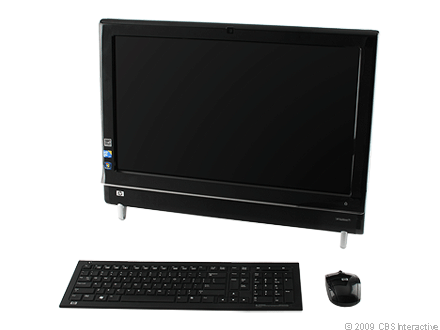
The HP TouchSmart 600 shows how getting an early jump on unproven technology can pay off. HP was first to market with a touch-based all-in-one PC more than two years ago. Now that Windows 7 has spurred almost every major desktop vendor toward multitouch, HP has the advantage of years of real market feedback to help refine the TouchSmart 600. The result, while still not perfect, is the best implementation of touch input we've seen so far in an all-in-one. Also to HP's credit (and likely Sony's chagrin), even if the TouchSmart 600 had no touch capability, by incorporating all of the features we've loved in Sony's Vaio LV line, HP has matched Sony in crafting a robust standalone home entertainment device. This $1,599, 23.5-inch all-in-one won't be for everyone, but those willing to find room for the TouchSmart A600, cooks especially, will be rewarded with an innovative, feature-rich all-in-one.

On the outside the TouchSmart 600 doesn't look that different from HP's previous all-in-one, the TouchSmart IQ816. It has the same glossy black plastic exterior, with graceful curves down its side. It's not quite as design-forward as the iMac, but it's as visually appealing, if not more so, than new all-in-ones from Gateway and Sony.

What HP's design lacked in its earlier version was an easy means to mount it on the wall. Sony made a big push last year to position its LV series all-in-ones as living room-ready devices, which had both the hardware and the design elements to match. Clearly taking a page from Sony's guidebook, HP has made the TouchSmart fully VESA-mount compliant. Simply unscrew a panel on the back and then unscrew the stand to reveal the wall-mount inputs.


HP made the TouchSmart 600 home entertainment-friendly by adding HDMI and composite audio/video inputs and a dedicated button for switching between sources.

HP has also borrowed from Sony's shrewd connectivity features, and taken them one step further. HP has added not only an HDMI input with a dedicated button for switching input signals, but also a set of composite video and audio ports as well. That means you can connect multiple external video sources to the TouchSmart, such as game consoles, a cable box, or HD cameras, and switch between them and your Windows desktop seamlessly. Sadly, but not surprisingly given the regulatory implications, you can't get Windows to talk to those devices, which means your DVR options are restricted to the built-in hybrid TV tuner. Sony's all-in-one has the same limitation.

Along with the inputs for external video sources, the TouchSmart A600 comes with a slot-loading Blu-ray drive, as well as touch-driven Hulu and Netflix interfaces into its new touch software carousel (more on that in a minute). All of these features would be meaningless without decent screen and audio quality to back them up, and for the most part the TouchSmart 600 delivers. The audio ouput is easily the strongest we've seen from an all-in-one this year, mostly because it's loud enough to fill a room. We noticed some pixel noise in the HD video from the 23.5-inch 1,920 x 1,080 display, but not enough to be distracting, especially if you're watching from a distance.

While HP has clearly borrowed from Sony in its wall-mounting and video input capabilities, the software designed for its touch interface is unique and just as compelling. We won't go over every feature in HP's custom-made application carousel, but you'll find the usual collection of painting, note taking, and other apps. But four new additions to HP's touch-screen arsenal set it apart, three from choosing partners wisely, and the fourth the product of its own development.


HP has partnered with Twitter, along with Netflix and Hulu, to add touch-friendly interfaces to those services via HP's touch software carousel.

The three partner programs provide straightforward interfaces with Hulu, Netflix, and Twitter via the TouchSmart software carousel. We asked HP about a possible Facebook interface and received a vague nondenial. Even without Facebook, accessing streaming content from Hulu and Netflix are smart, obvious choices to add to the home entertainment-oriented TouchSmart 600. Of course you could simply get to those services via a standard browser window, but making them touch-friendly actually makes them easier to use, especially if you put the TouchSmart in a place in your home where you might walk up and use it.

Your kitchen may be the most obvious place for many of you to install a PC you might walk up to, at least provided you have the counter space. If you do bring it into your kitchen, you'll be able to take advantage of one of the TouchSmart 600's best features. Scroll along the TouchSmart's application carousel and you'll find the Recipe Box program, which gives you the best tool we've seen for organizing recipes you find from the Internet.

Recipe Box has a built-in browser window from which you can navigate to, and bookmark, any Web site. Once you find a recipe online, the Recipe Box software can scrape it, and then format it properly onto a touch-friendly form, neatly isolating ingredients and instructions. You can then use Recipe Box's built-in voice recognition and text-to-speech software to verbally command the TouchSmart to read the recipe back to you out loud, step-by-step.


We hate to say "killer app", but HP's Recipe Box touch app might convince foodies that a PC in the kitchen actually makes sense.

We found the scraping capability worked with more sites than not, with a few notable exceptions. We were able to pull recipes down from Epicurious, Food Network, Martha Stewart, and About with no transcription errors and mostly perfect formatting. We had no luck at Food and Wine Magazine and Cook's Country, however. You can enter recipes manually, and also edit and add notes to recipes you pull down automatically, but the capability to grab and organize recipes from the Web in such a highly intuitive manner will surely appeal to Web-inclined chefs.

The voice-recognition and text-to-speech capabilities are more of a work in progress. Standing a foot, and then 5 feet away from the TouchSmart, we had luck on our first try speaking commands like "Beginning," "Back," and "Continue," to advance the text-to-speak function through each recipe. Voice-recognition training software can help you improve accuracy, but we found the TouchSmart had trouble recognizing our voice when we stood off at an angle. It also sometimes took a few tries before it responded to our commands, and it also wouldn't recognize voices other that of your reviewer. A Bluetooth headset (not included) can let you command Recipe Box from longer distances.

As promising as we find HP's new touch programs, Recipe Box in particular, we found the touch interface unresponsive at times, and the main touch software carousel can be slow to load. The lag time is similar to what we found with Gateway's first Windows 7-based touch all-in-one, the One ZX6810-01. As long as you're patient with the touch response and willing to suffer a few repeated finger movements, the experience is for the most part fine, but it's clear that there's still room for the technology to improve.

Price Range : $929.99 - $1,345.00